Nginx Reverse Proxy là gì? Cấu hình Node.js trên VPS
Giải thích Nginx reverse proxy và cách cấu hình proxy_pass cho Node.js, Next.js, NestJS; hỗ trợ HTTPS, WebSocket, upload và nhiều domain.
Bài viết bởi Phạm Minh Thiện
Front-end Developer, trực tiếp thực hành Next.js, NestJS, Docker, Nginx và VPS Ubuntu.
Bài viết đã được kiểm tra lại ngày 21/7/2026.
Mục lục bài viết
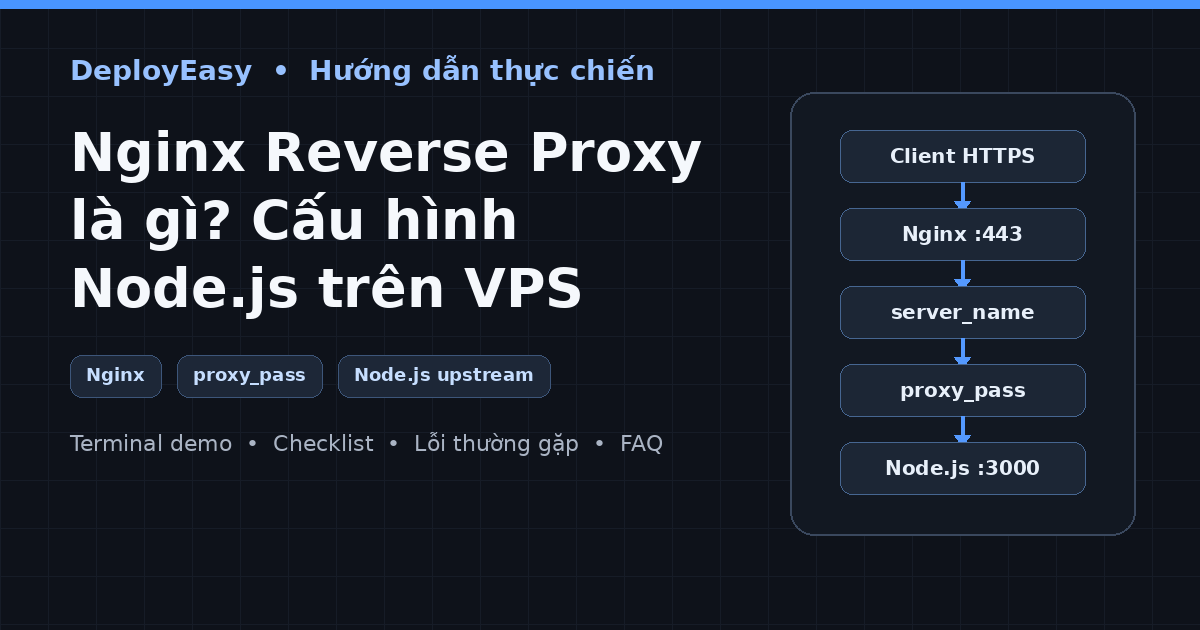
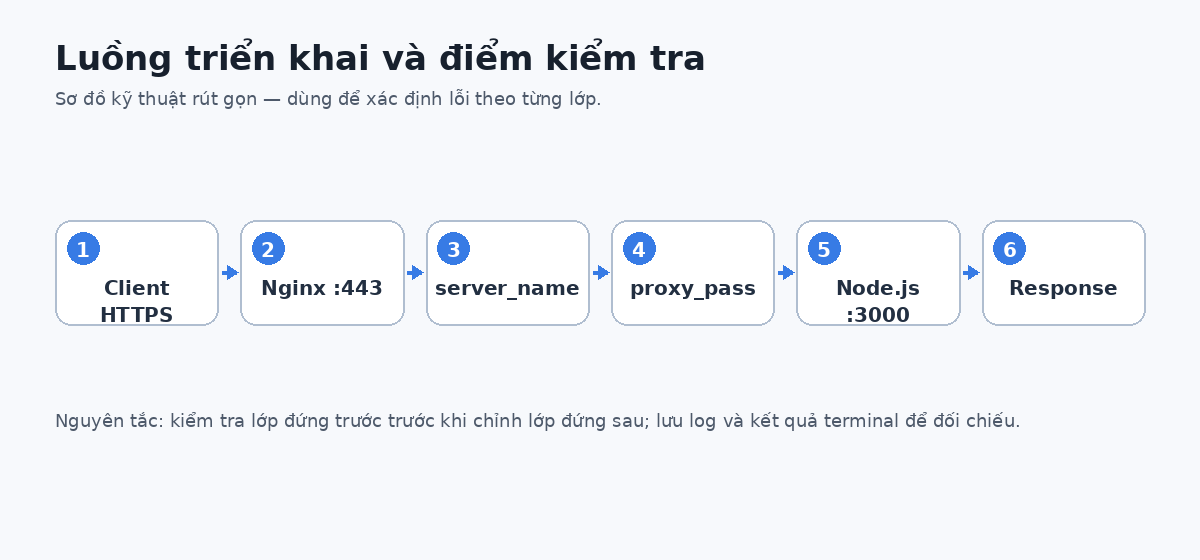
Nginx Reverse Proxy là gì? Đây là lớp đứng trước ứng dụng, nhận request từ domain ở cổng 80/443 rồi chuyển tới upstream như Node.js, Next.js hoặc NestJS đang chạy ở cổng nội bộ. Nhờ đó, người dùng không cần truy cập :3000, còn server có một nơi tập trung để cấu hình HTTPS, log, upload limit, timeout và nhiều domain.
Bài viết giải thích từng directive quan trọng, khác biệt của dấu / trong proxy_pass, cách truyền header, hỗ trợ WebSocket và quy trình kiểm tra an toàn trước khi reload Nginx.
Tóm tắt nhanh: Cho app bind vào cổng nội bộ; dùng
server_nameđúng domain; đặtproxy_passđúng upstream; truyền Host và X-Forwarded headers; luôn chạynginx -ttrước khi reload.
Demo terminal: kiểm tra upstream trước khi reload Nginx
Khi gặp 502, hãy gọi trực tiếp upstream. Nếu curl 127.0.0.1:3000 thất bại thì vấn đề nằm ở ứng dụng, cổng hoặc container chứ không phải cú pháp Nginx.
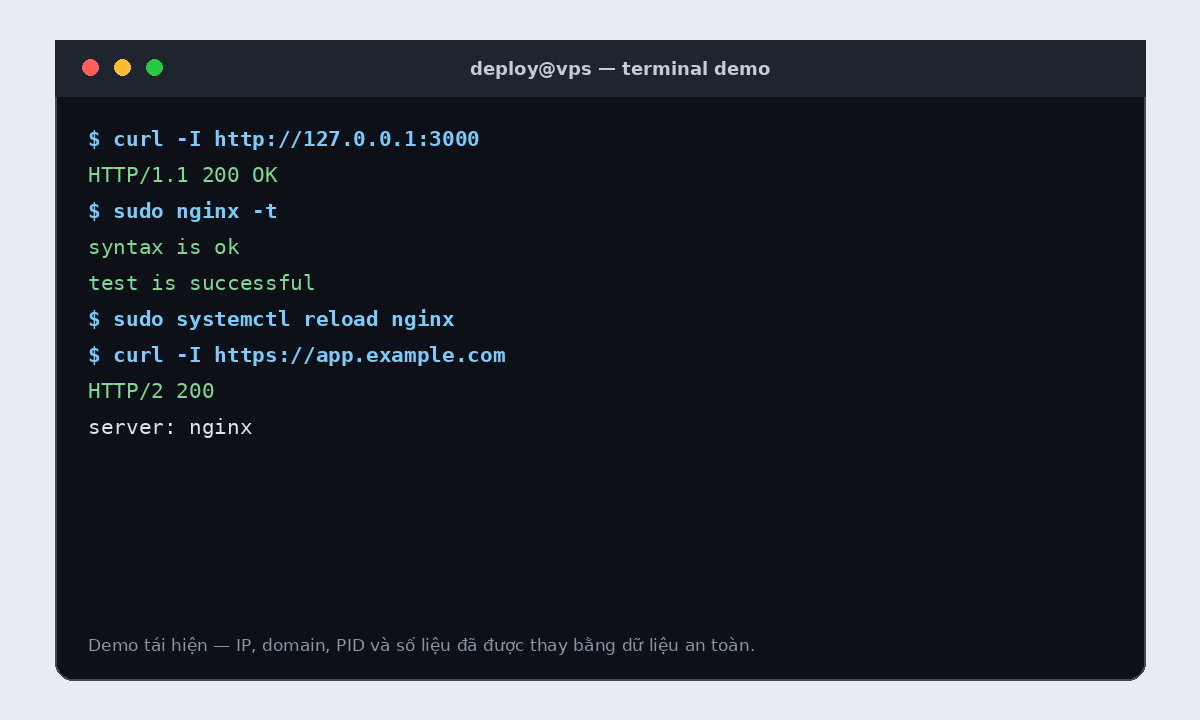
curl -v http://127.0.0.1:3000/health
ss -lntp | grep :3000
sudo nginx -t
sudo systemctl reload nginx
curl -I https://app.example.com
sudo tail -n 50 /var/log/nginx/error.log
Lưu ý: Output trong ảnh và ví dụ là demo lab đã ẩn thông tin nhạy cảm. Khi chụp terminal thật, hãy che IP quản trị, username nội bộ, token, private key, mật khẩu và chuỗi kết nối database.
Nginx là gì?
Nginx là web server, reverse proxy, content cache, load balancer và TCP/UDP proxy.
Internet
   ↓
Nginx :80/:443
   ↓
Node.js :3000
Reverse proxy là gì?
Reverse proxy đứng trước server ứng dụng và thay mặt client gửi request tới upstream.
Client → Reverse proxy → ApplicationClient chỉ biết:
https://api.deployeasy.vnỨng dụng thật có thể chạy:
http://127.0.0.1:3001Vì sao không public trực tiếp port app?
Production thường cần:
- Domain.
- HTTPS.
- Redirect.
- Nhiều app trên một IP.
- Request log.
- Upload limit.
- Timeout.
- Static file.
- Load balancing.
Nginx cung cấp lớp cấu hình tập trung cho các nhu cầu này.
Cài Nginx
sudo apt update
sudo apt install -y nginx
Kiểm tra:
sudo systemctl status nginxFirewall:
sudo ufw allow "Nginx Full"Cấu trúc Nginx trên Ubuntu
/etc/nginx/
├── nginx.conf
├── sites-available/
├── sites-enabled/
├── conf.d/
└── snippets/sites-available: lưu cấu hình.sites-enabled: symlink site đang bật.
Tạo server block
sudo nano /etc/nginx/sites-available/deployeasyserver {
listen 80;
listen [::]:80;
server_name deployeasy.vn www.deployeasy.vn;
location / {
proxy_pass http://127.0.0.1:3000;
proxy_http_version 1.1;
proxy_set_header Host $host;
proxy_set_header X-Real-IP $remote_addr;
proxy_set_header X-Forwarded-For $proxy_add_x_forwarded_for;
proxy_set_header X-Forwarded-Proto $scheme;
}
}Bật:
sudo ln -s /etc/nginx/sites-available/deployeasy \
  /etc/nginx/sites-enabled/deployeasy
Kiểm tra và reload:
sudo nginx -t
sudo systemctl reload nginx
Giải thích cấu hình
listen
listen 80;
listen [::]:80;
Lắng nghe HTTP IPv4 và IPv6.
server_name
server_name deployeasy.vn www.deployeasy.vn;Chọn request theo Host header.
proxy_pass
proxy_pass http://127.0.0.1:3000;Chuyển request tới ứng dụng.
Header Host
proxy_set_header Host $host;Giữ domain gốc cho app.
IP client
proxy_set_header X-Real-IP $remote_addr;
proxy_set_header X-Forwarded-For $proxy_add_x_forwarded_for;
Truyền thông tin IP qua proxy. Ứng dụng chỉ nên trust proxy đáng tin cậy.
Protocol gốc
proxy_set_header X-Forwarded-Proto $scheme;Cho app biết request public dùng HTTP hay HTTPS.
App nên bind vào đâu?
Nếu Nginx và app cùng VPS:
127.0.0.1:3000Ví dụ:
app.listen(3000, "127.0.0.1");Nếu app nằm trong Docker:
ports:
  - "127.0.0.1:3000:3000"
Dấu / trong proxy_pass
Hai cấu hình sau có thể xử lý URI khác nhau:
location /api/ {
    proxy_pass http://127.0.0.1:3000/;
}
location /api/ {
proxy_pass http://127.0.0.1:3000;
}Khi proxy theo prefix, cần test URL thật thay vì thêm/bỏ slash theo cảm tính.
WebSocket
location /socket/ {
    proxy_pass http://127.0.0.1:3000;

    proxy_http_version 1.1;
    proxy_set_header Upgrade $http_upgrade;
    proxy_set_header Connection "upgrade";

    proxy_set_header Host $host;
    proxy_set_header X-Real-IP $remote_addr;
    proxy_set_header X-Forwarded-For $proxy_add_x_forwarded_for;
    proxy_set_header X-Forwarded-Proto $scheme;
}
Chỉ thêm khi ứng dụng cần WebSocket.
Upload file
server {
    client_max_body_size 20M;
}
Ứng dụng vẫn phải kiểm tra loại file, kích thước, tên và quyền truy cập.
Timeout
location / {
    proxy_pass http://127.0.0.1:3000;

    proxy_connect_timeout 10s;
    proxy_send_timeout 60s;
    proxy_read_timeout 60s;
}
Không tăng timeout quá lớn để che API chậm. Tác vụ dài nên cân nhắc queue.
Phục vụ static file
location /uploads/ {
    alias /var/www/deployeasy/uploads/;
}
Cần chú ý permission và không phục vụ file riêng tư thiếu xác thực.
Cache asset
location ~* \.(css|js|png|jpg|jpeg|gif|svg|webp|ico)$ {
    expires 7d;
    add_header Cache-Control "public";
}
File có hash có thể cache dài hơn. Không cache HTML/API một cách máy móc.
Nhiều app trên một VPS
server {
    listen 80;
    server_name deployeasy.vn;

    location / {
        proxy_pass http://127.0.0.1:3000;
    }
}

server {
    listen 80;
    server_name api.deployeasy.vn;

    location / {
        proxy_pass http://127.0.0.1:3001;
    }
}

server {
    listen 80;
    server_name admin.deployeasy.vn;

    location / {
        proxy_pass http://127.0.0.1:3002;
    }
}
Load balancing
upstream deployeasy_api {
    server 127.0.0.1:3001;
    server 127.0.0.1:3002;
}

server {
    listen 80;
    server_name api.deployeasy.vn;

    location / {
        proxy_pass http://deployeasy_api;
    }
}
Ứng dụng cần stateless hoặc có shared session phù hợp.
Redirect www
server {
    listen 80;
    server_name www.deployeasy.vn;

    return 301 http://deployeasy.vn$request_uri;
}
Sau HTTPS, redirect về URL HTTPS chính.
Log
/var/log/nginx/access.log
/var/log/nginx/error.log
Theo dõi:
sudo tail -f /var/log/nginx/error.log
sudo journalctl -u nginx --since "30 minutes ago"
Quy trình sửa an toàn
sudo nginx -tChỉ reload khi hợp lệ:
sudo systemctl reload nginxBackup:
sudo cp /etc/nginx/sites-available/deployeasy \
  /etc/nginx/sites-available/deployeasy.bak
Lỗi 502 Bad Gateway
Kiểm tra app:
curl -I http://127.0.0.1:3000
sudo ss -ltnp | grep 3000
Xem log:
sudo tail -n 100 /var/log/nginx/error.logNguyên nhân:
- App chưa chạy.
- Sai port.
- App crash.
- Bind sai interface.
- Container chưa publish.
- Timeout.
- Socket permission.
Lỗi 404 từ Nginx
Có thể:
server_namekhông khớp.- Request rơi vào default server.
- Site chưa enable.
- Symlink sai.
- DNS trỏ nhầm.
Xem config hiệu lực:
sudo nginx -TCSS trả về text/html
Nếu request CSS nhận HTML, thường do:
- File build không tồn tại.
- Request fallback về trang HTML.
- Deploy thiếu static asset.
- HTML và asset khác version.
- Nginx location sai.
Không chỉ ép Content-Type: text/css; phải sửa routing hoặc artifact.
Cấu hình mẫu
server {
    listen 80;
    listen [::]:80;

    server_name api.deployeasy.vn;

    client_max_body_size 10M;

    access_log /var/log/nginx/deployeasy-api.access.log;
    error_log /var/log/nginx/deployeasy-api.error.log;

    location / {
        proxy_pass http://127.0.0.1:3001;

        proxy_http_version 1.1;

        proxy_set_header Host $host;
        proxy_set_header X-Real-IP $remote_addr;
        proxy_set_header X-Forwarded-For $proxy_add_x_forwarded_for;
        proxy_set_header X-Forwarded-Proto $scheme;

        proxy_connect_timeout 10s;
        proxy_send_timeout 60s;
        proxy_read_timeout 60s;
    }
}
Checklist
[ ] DNS đúng IP
[ ] App chạy port nội bộ
[ ] curl localhost thành công
[ ] server_name đúng
[ ] proxy_pass đúng
[ ] Header proxy đủ
[ ] WebSocket nếu cần
[ ] Upload limit phù hợp
[ ] nginx -t thành công
[ ] Firewall mở 80/443
[ ] Log riêng cho app
[ ] HTTPS sau khi HTTP chạy
Câu hỏi thường gặp
Nginx có chạy app Node.js không?
Không. Node.js vẫn cần PM2, systemd, Docker hoặc runtime khác.
Có cần Nginx khi dùng Vercel?
Không cần tự cài Nginx cho deployment do Vercel quản lý.
Có nên public port 3000?
Nếu chỉ Nginx cần truy cập, nên bind localhost.
Bài viết liên quan
- Deploy Node.js bằng PM2 và Nginx
- Sửa lỗi Nginx 502 Bad Gateway
- Cài HTTPS bằng Certbot
- Cách trỏ tên miền về VPS
Kết luận
Nginx reverse proxy tách lớp Internet khỏi ứng dụng. Hãy làm app chạy tốt trên localhost trước, rồi mới thêm Nginx, domain và HTTPS.
Nguồn tham khảo
Đọc tiếp
Bài viết liên quan
Cài SSL HTTPS miễn phí bằng Certbot và Nginx trên Ubuntu
Hướng dẫn cài SSL HTTPS miễn phí bằng Certbot và Nginx trên Ubuntu, kiểm tra DNS, mở port, tự động gia hạn và sửa lỗi ACME challenge.
Đọc bài →Nginx 502 Bad Gateway khi deploy Node.js: Checklist kiểm tra từ ngoài vào trong
Cách tìm nguyên nhân Nginx 502 khi deploy Next.js, NestJS hoặc Node.js bằng curl, ss, systemctl, PM2 và Docker Compose.
Đọc bài →Deploy Node.js lên VPS bằng PM2 và Nginx từ A–Z
Hướng dẫn deploy Node.js lên VPS Ubuntu bằng PM2 và Nginx: build, biến môi trường, reverse proxy, HTTPS, log, healthcheck và rollback.
Đọc bài →